

If your landing page gets clicks but few calls or form submissions, the cause is almost always one of four things: the wrong visitors, a page that does not match the promise that brought them, a slow or awkward mobile experience, or a next step that is unclear or too costly. Work through them in that order, fix one at a time, and measure each change. For a local service business in Southwest Florida, we build the page, the Google Business Profile and the ad message to say the same thing, which is where most leaks close. You can see where yours stands with our free AI + SEO website audit.
Key Takeaways
- Find out first whether the problem is your traffic or your page: compare bounce and conversion by source before you touch the design.
- Message match comes before button colors. The headline must repeat what the ad, search result or Google listing promised.
- A service page should name the service and city, show a click-to-call button and offer one obvious next step on the first screen.
- Slow mobile loading quietly kills leads. Google’s own guidance puts a good load target at 2.5 seconds for the main content.
- Do not trust a test until the page has enough visits and you have confirmed the call or form event is actually being recorded.
Table of Contents
- Start by finding where the leak is
- Fix the message match first
- What the first screen of a local service page needs
- Speed and mobile: the silent conversion killers
- Make the next step easy and believable
- Test one change at a time, and measure the right event
- Where our Lumina package fits
- Our perspective on why local landing pages stall
- A simple 30-day plan
- FAQ
- Sources
Start by finding where the leak is
Before you rewrite anything, decide which of three problems you have. Each one needs a different fix, and guessing wastes weeks.
A traffic problem. The wrong people are arriving. A roofer bidding on the broad term “roof” pays for clicks from people looking for DIY repair videos or jobs in other states. They leave in seconds, and no headline can save that visit.
An offer or message problem. The right people arrive, then hesitate. They read the top of the page, do not see what they searched for, and leave.
An action problem. They are interested, scroll the whole page, and then do not call or submit the form. The next step is hidden, vague or asks for too much.
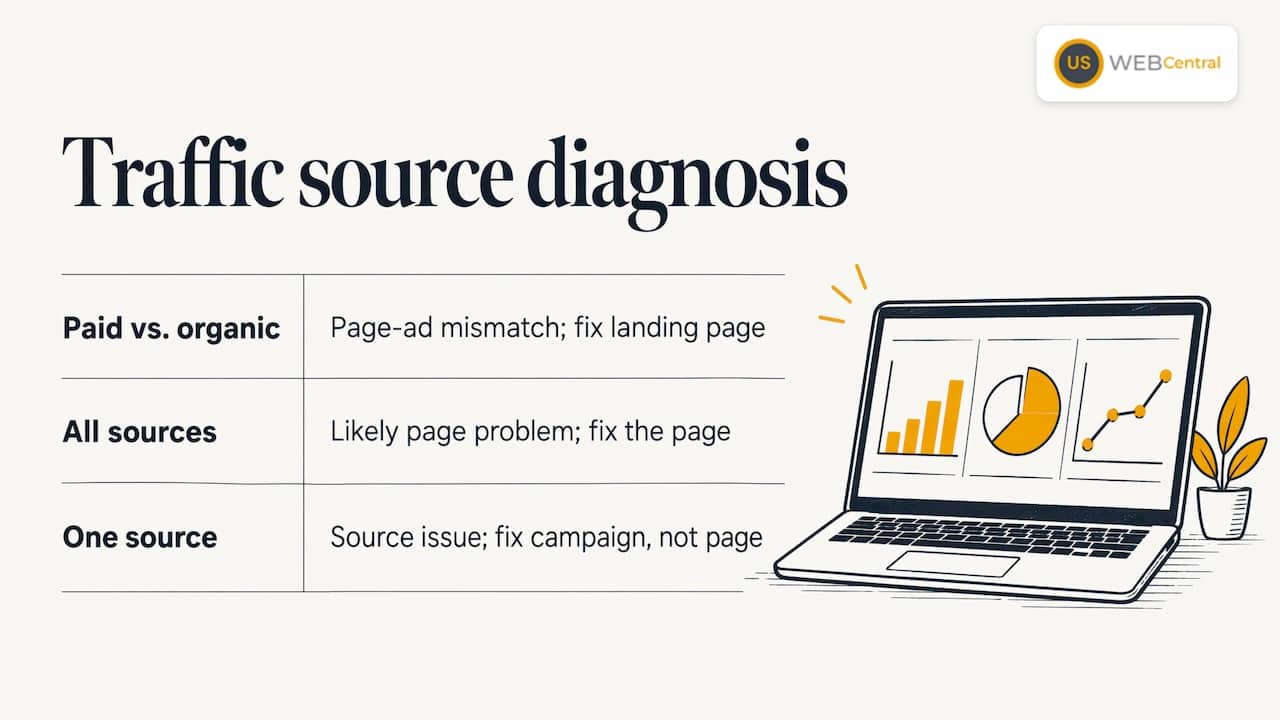
A quick way to separate them is to look at the same page by traffic source in Google Analytics. If paid traffic bounces heavily while organic visitors or people coming from your Google Business Profile behave well, the page is probably not delivering what the ad promised. If every source converts poorly, the page itself is the likelier culprit. If one source is bad and the rest are fine, that source is the problem and the fix is in the campaign, not the page.
Keep the sample size in mind. A page with 40 visits last week tells you very little. A single missed call can swing a small page from “great” to “broken.” Give a page a few hundred visits, or a few weeks for a low-traffic service area, before deciding what the numbers mean.
What a normal conversion rate looks like
Most owners ask whether their number is actually bad. Published benchmarks vary widely by industry, traffic source and how “conversion” is counted, so treat them as a rough range, not a grade. Compare against your own history and your own cost per lead. A page that converts 4% of visitors into calls at a price you can profitably serve beats a page that converts 9% of visitors who never book. For a home service company, the number that matters is booked jobs per dollar of ad spend, not form fills.
Fix the message match first
The most common reason a paid click does not convert is a broken promise. Someone searches “AC repair Sarasota,” clicks an ad that says “Same-day AC repair in Sarasota,” and lands on a homepage headline reading “Quality Service You Can Trust.” Nothing on the screen confirms they are in the right place, so they go back and click the next result.
Payments company Stripe lists message match as a major factor in conversion rate, and notes that sending visitors to a homepage or category page instead of a dedicated landing page can reduce conversions. The principle applies as much to a plumber as to an online store.
To check your own match, do this exercise:
- Write down the exact ad headline, search term or Google listing text that led to the page.
- Open the page on your phone and read only the top of the screen.
- Ask whether a stranger would see the same words, the same service and the same city.
- If not, rewrite the headline to repeat the promise, then support it with one sentence on what happens next.
One page per service and per core city works better than one page for everything. A visitor looking for roof replacement in Port Charlotte should not have to find it inside a general “Our Services” page. Our guide on roofing website design shows how that looks for a roofer, and our clinic website design page does the same for patients choosing a practice.
Match your Google Business Profile too
A lot of local conversions start on Google Maps, not on your site. Someone sees your listing, taps through, and lands on your page. If your profile says “24/7 emergency plumbing” and the page leads with a general maintenance offer, that is the same broken promise in a different place. We design the website content and the Google Business Profile to match, so the services, service areas and wording line up from the listing to the page. If your listing needs attention, our Google Business Profile optimization page explains what we set up.
What the first screen of a local service page needs
Homeowners with a broken air conditioner do not read. They scan for three things. Service Nation, a business training organization for home service contractors, says a service landing page that books jobs does three things on the first screen: it names the service and location, such as “AC Repair in Dallas,” shows how to make contact right now with a click-to-call button and a visible phone number, and presents one obvious next step like “Schedule Service” or “Book Now.”
Here is a checklist you can apply today:
| Element | What to check on your page |
|---|---|
| Headline | Names the service and the city, in the same words your customers use |
| Phone number | Visible without scrolling, and a tap-to-call button on mobile |
| Primary button | One action, worded as an outcome: “Request Service,” “Schedule Service” |
| Proof | Review count and rating, license, years in business, near the top |
| Form | Short: name, phone, email, service needed, preferred time |
| Navigation | Stripped down or removed so visitors are not pulled away |
Button wording matters more than most owners expect. A label such as “Submit” or “Get started” tells the visitor nothing. A label that names the result, such as “Request a time,” tells them what they get. The same Service Nation guidance suggests button copy like “Request Service” or “Get My Appointment.”
One page, one job
Pages that try to sell five services, collect newsletter signups, link to the blog and showcase the team spread attention thin. If the visitor came for a quote on a new roof, every other link is a chance to leave. Pick the one action that makes you money, make it the obvious path, and let secondary options sit lower on the page where they do not compete with it.
Speed and mobile: the silent conversion killers
Most of your visitors are on a phone, often in a hurry, often on a spotty connection in a driveway or a waiting room. A page that takes too long loses them before the headline appears.
Google’s own Ads guidance says that one of the easiest ways to improve mobile ad results is speeding up your landing pages, and it cites a retail finding that a one-second mobile delay can cut mobile conversions by up to 20 percent. Retail is not roofing, but the behavior is the same: people do not wait.
A study by Deloitte Digital for Google, covering mobile data from 37 brands in Europe and the US, found that a 0.1-second improvement in mobile speed raised conversion rates by 10.1% for travel and 8.4% for retail consumers. The study covers retail, travel, luxury and lead generation brands, so it is a fair signal that small speed gains matter.
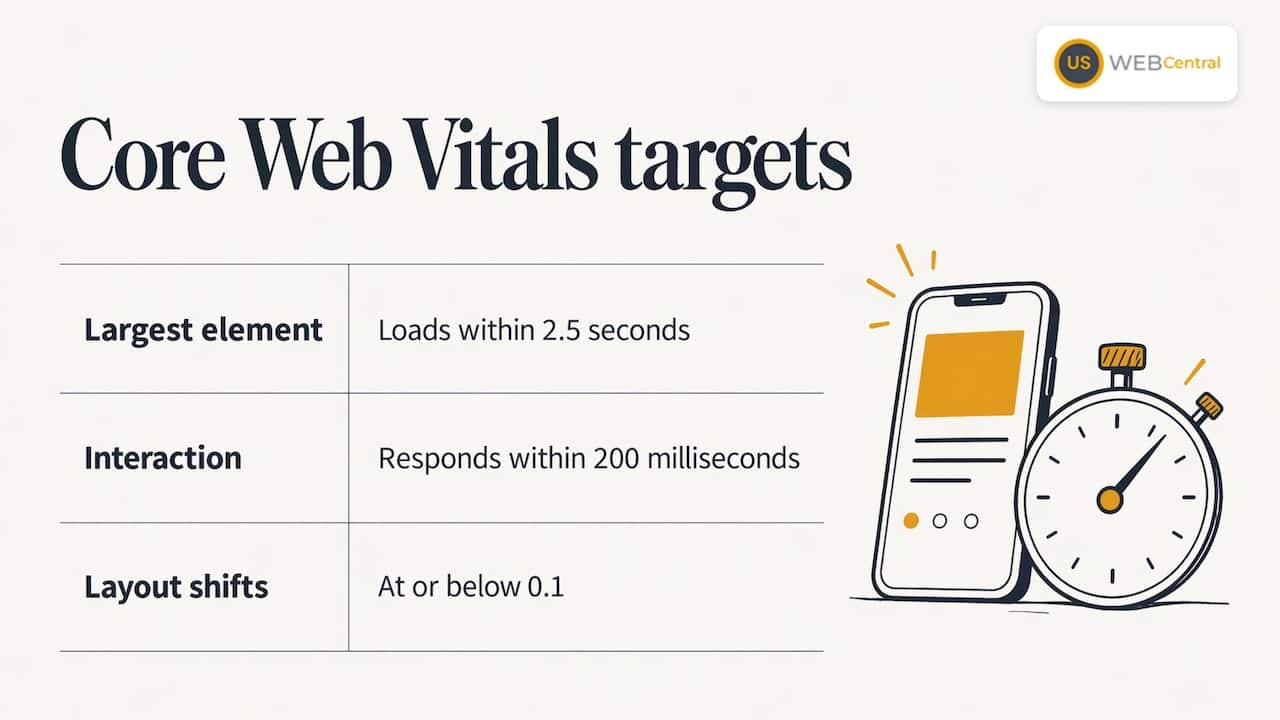
For a concrete target, Google’s web performance team recommends that the largest element loads within 2.5 seconds, interaction responds in 200 milliseconds or less, and layout shifts stay at or below 0.1. Those three measures are called Core Web Vitals.
Common causes on small business WordPress sites are oversized photos, too many plugins and scripts, sliders and video backgrounds, and cheap shared hosting. Compressing images, trimming scripts and moving to faster hosting are the usual first fixes. Our PageSpeed Insights optimization work covers this, and our SEO hosting is built around speed.
Also check mobile layout by hand. Open the page on a real phone and try to do what a customer would do: tap the phone number, fill in the form with your thumb, close any pop-up. If any of that is annoying, you have found a leak.
Make the next step easy and believable
If visitors scroll the whole page and still do not act, the page has either not convinced them or has not made the next step clear. Both are fixable.
Shorten the form
Every field is a reason to quit. For most local service work, you need a name, a phone number, the service needed and maybe a preferred time. Asking for a budget, a company size and a detailed project description before you have earned any trust costs you leads. Add a clear line near the button on what happens next, such as “We call you back within the hour during business hours,” but only if you actually do it.
Put trust where the doubt is
Trust signals work best next to the moment of doubt. A form asks for a phone number, so place reviews, a license number or a “no obligation” line right beside it. A price-sensitive visitor needs to see how you handle quotes. Someone worried about a messy job wants to see photos of finished work and real reviews. In Southwest Florida, where customers often choose between several contractors with a few taps, a visible review count and rating on the page carries real weight. For a closer look at how reviews influence the click, see our post on fixing a Google Business Profile that costs you leads.
Make calling effortless
For emergency trades such as HVAC, plumbing, pest control and roof leaks, the phone is the conversion. A tap-to-call button that stays visible as the visitor scrolls, plus a number in the header, removes the hunt for contact details. Check that call tracking is in place so you know which page produced the call.
Test one change at a time, and measure the right event
Once you have fixed the obvious problems, tests can tell you what works. Do them in a sensible order: offer, message match, headline, button, form, proof, mobile experience, then visual polish. Color and font tweaks come last, because they rarely rescue a page whose promise is wrong.
Two rules keep your results honest:
- Confirm tracking before you start. If your site does not record a form submission or a call as a goal, a test cannot measure anything. Submit your own form and tap your own call button, then confirm the event shows up in your reports.
- Change one thing, then wait. Testing a new headline, a new photo and a new form together means you will not know which one worked. Let the page collect enough visits before declaring a winner.
Measure past the form fill. A change that doubles form submissions but sends you spam or out-of-area requests did not improve the business. Track qualified leads and booked jobs, not just clicks.
Where our Lumina package fits
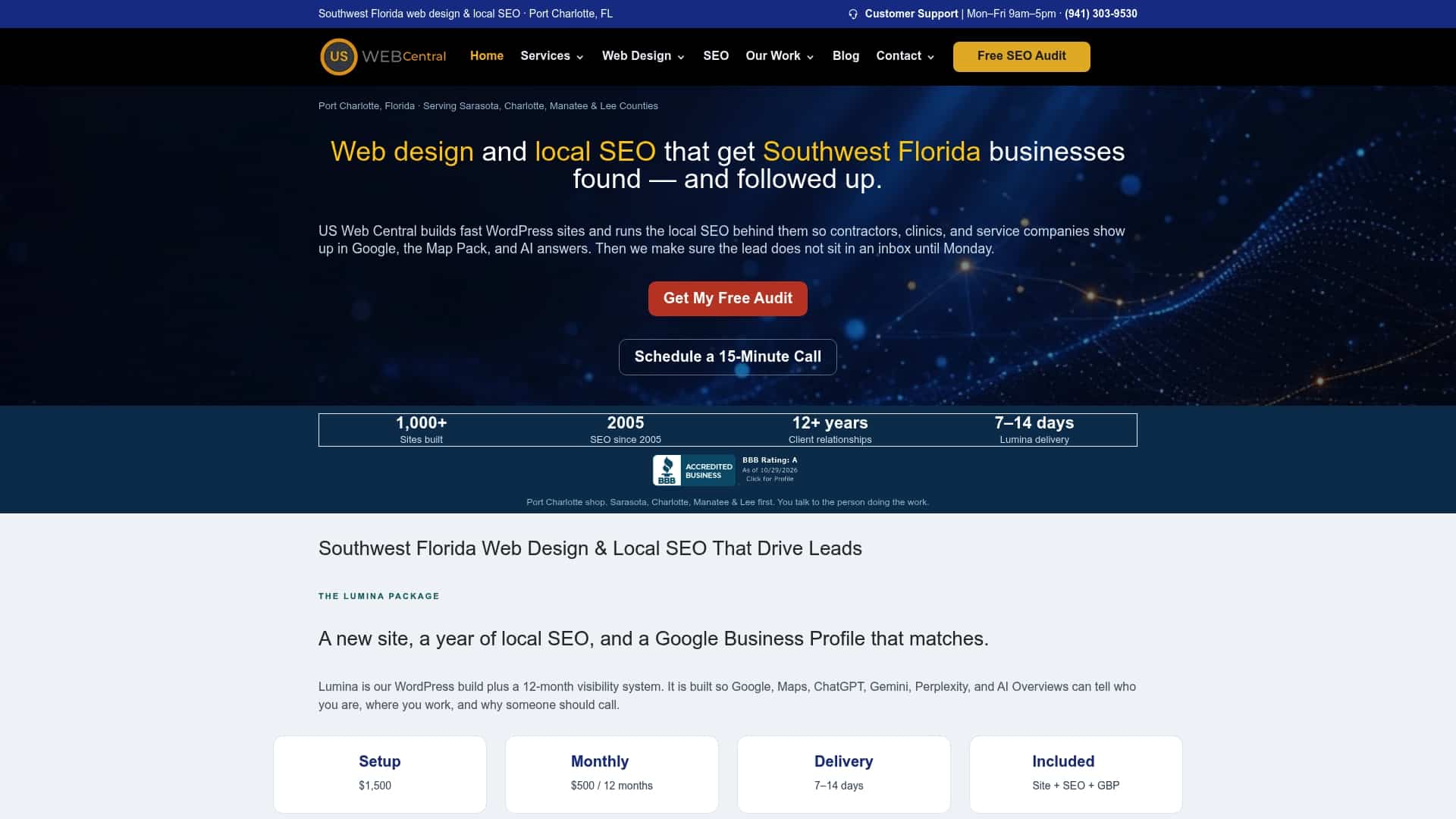
Most of the problems above live in the space between the website, the Google Business Profile, the ads and the content. When those are handled by different people, nobody owns the match between them. Our Lumina package combines a custom WordPress website with a 12-month local SEO plan covering Google, Maps and AI search visibility. It includes Google Business Profile setup, monthly AI-ready content, citation and NAP consistency, and technical audits. You work directly with the implementation team that builds and maintains the site.
Pricing is published: a setup fee of $1,500 and monthly maintenance and SEO at $500 per month, with details on our Lumina pricing and availability page. SEO hosting is $250 per year. If paid ads are part of your plan, ad setup for Sequence, Meta or Google Ads is $100 per hour, and our Lumina Growth Engine setup is $500 one-off. We explain how the two ad platforms compare in Google Ads vs Meta Ads, and how we run Meta ads management for contractors.
One Sarasota HVAC company reported nearly tripling its website visits after optimization, which you can read in the AC Heroes case study.
If you want to know which of the fixes in this article applies to your page, start with the free AI + SEO website audit. It is the fastest way to see whether speed, message match or your Google listing is the weak point.
Our perspective on why local landing pages stall
Most of the landing pages we are asked to look at do not have a design problem. They have a consistency problem. The Google listing says one thing, the ad says another, and the page opens with something generic. The visitor has two seconds to decide whether they are in the right place, and a vague headline loses them.
That is why we build the website, the Google Business Profile and the content as one system. When the services, the cities and the wording match from the search result to the page, visitors stay and call. Speed matters just as much: a technical site that loads fast on a phone gives the message a chance to be read.
We would rather fix the structure behind the page than change a button color and hope. That means one page per service, a clear phone number, a short form and content that answers the questions a customer in Sarasota, Port Charlotte or Fort Myers actually asks before they pick up the phone.
Scott Carvin
A simple 30-day plan
| Week | Focus | What you do |
|---|---|---|
| 1 | Diagnose | Check bounce and conversions by source, confirm call and form tracking works |
| 2 | Message match | Rewrite headlines to repeat the ad and listing promise; one page per service |
| 3 | Speed and mobile | Compress images, remove unused plugins, test on a real phone |
| 4 | Action and trust | Shorten the form, add a tap-to-call button, move reviews beside the form |
After the month, look at qualified leads and cost per booked job, then pick the next single change to test. If you would like help with any of these steps, our Do I Need a New Website? page helps you judge whether an update or a rebuild makes sense.
FAQ
Why am I getting clicks but no conversions?
Usually the page does not continue the promise that earned the click, or the next step is unclear. Check whether the headline repeats the ad or listing wording, whether the phone number and button are visible on a phone, and whether the form asks for too much. If the wrong people are clicking, tighten your keywords and the area you target.
Why isn’t my website converting?
Start with traffic quality, then message match, then speed and the call to action. Compare results by traffic source: if all sources convert poorly, the page is likely the problem. Also confirm that your calls and form submissions are actually being tracked, because a broken goal can make a good page look bad.
What should a local service landing page include?
The service and city in the headline, a visible phone number with a tap-to-call button, one clear next step, a short form, and proof such as reviews and licensing. Keep navigation minimal so visitors are not pulled away from the one action you want.
How fast should my landing page load?
Google’s guidance for a good experience is for the largest element to load within 2.5 seconds. Pages built for phones, with compressed images and few scripts, reach that more easily. Test your page in PageSpeed Insights and fix the largest items first.
Sources
- Ecommerce Landing Pages: What Drives Conversions, Stripe
- Service Landing Page Optimization for Booked Jobs, Service Nation
- Evaluate the performance of your landing pages, Google Ads Help
- Milliseconds Make Millions, Deloitte Digital for Think with Google
- Web Vitals, web.dev