

WordPress site maintenance is the recurring work that keeps a site secure, backed up, fast and working: updating WordPress, plugins and themes, taking backups, watching for problems, and fixing what breaks. For a contractor, clinic or service company in Sarasota, Port Charlotte or Fort Myers, the site is where calls and form fills come from, so maintenance is part of running the business. Our Monthly Maintenance & SEO plan is $500 per month, and it pairs site upkeep with the local SEO work that turns a healthy site into booked jobs.
Key Takeaways
- Maintenance means updates, backups, security checks, speed checks and testing the pages that bring in leads, on a schedule.
- WordPress’s own documentation says to check for updates at least every three months, and the project warns that old versions do not receive security fixes.
- A site that is secure but never checked can still lose leads: a broken contact form or a slow phone page costs you calls without any alarm going off.
- Most local owners do better handing maintenance to the team that built the site, so the same people know the theme, plugins and hosting.
- Our Lumina package combines the website, 12 months of local SEO and ongoing maintenance for a published setup fee and monthly price.
Table of Contents
- What WordPress Site Maintenance Actually Covers
- How Often Each Task Is Due
- What Goes Wrong When Maintenance Is Skipped
- What a Short Outage Looks Like
- Doing It Yourself or Handing It Off
- What Maintenance Should Include for a Local Service Business
- Hosting Is Part of Maintenance
- Our Perspective
- What It Costs With Us
- A Plan for Your Site
- A Simple Monthly Routine You Can Hold Anyone To
- FAQ
- Sources
What WordPress Site Maintenance Actually Covers
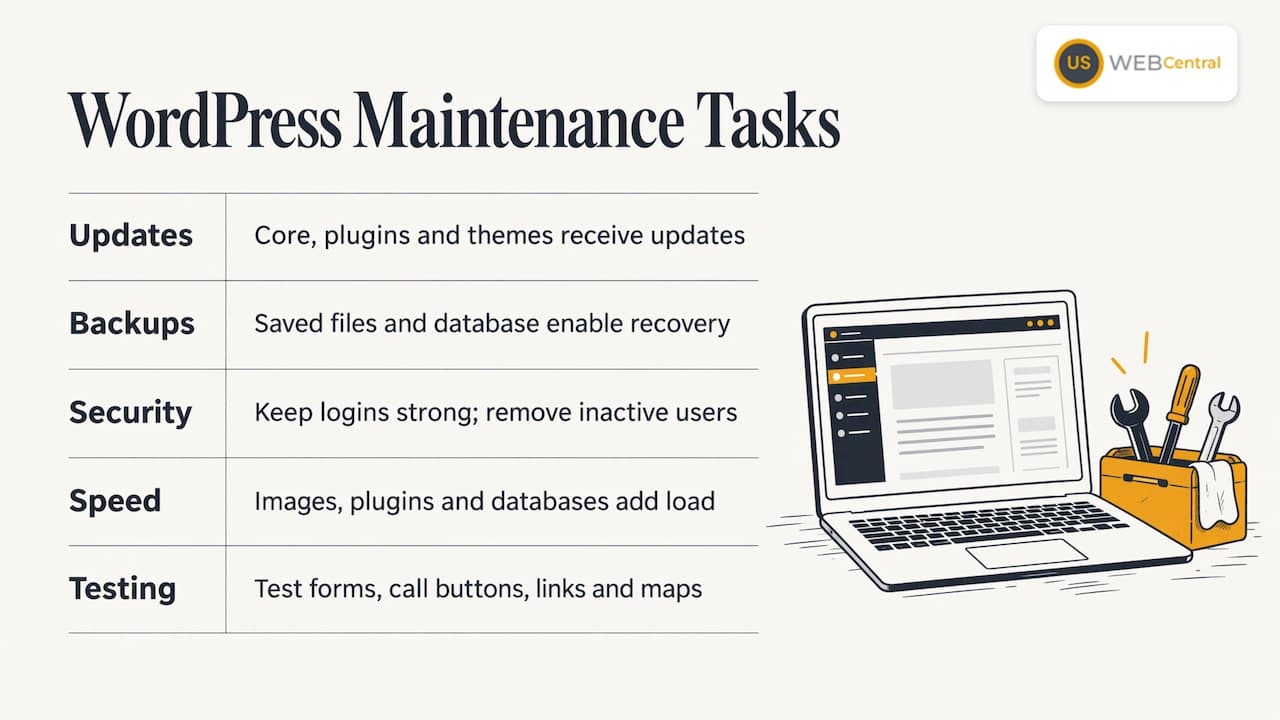
Think of it as five jobs. Each one protects something different.
Updates. WordPress core (the platform itself), plugins (add-on features like forms, galleries or booking tools) and your theme (the design layer) all release updates. Many of them are security fixes. The WordPress project states that older versions are not maintained with security updates, and that once a fix ships, the details of the weakness are effectively public. That is why a site left alone for a year becomes an easy target.
Backups. A backup is a saved copy of your files and database. If an update breaks the site, a hack wipes it or a hosting problem hits, a recent backup is the difference between restoring in minutes and rebuilding from scratch. The same WordPress guidance says to keep a regular backup, and to store copies somewhere an attacker cannot reach them.
Security. This means keeping logins strong, removing users who no longer work with you, deleting plugins you do not use and watching for suspicious changes. Most of it is routine housekeeping rather than anything exotic.
Speed and performance. Images pile up, plugins add weight and databases bloat. A page that takes too long to load on a phone loses the visitor who is searching for an emergency AC repair. Our guide to PageSpeed Insights optimization explains how those scores relate to rankings.
Functional testing. Forms, click-to-call buttons, booking links and maps should all be tested. Updates can quietly break them. This is the task most owners skip, and the one that costs the most leads.
How Often Each Task Is Due
The official WordPress documentation on site maintenance gives a useful baseline. It suggests housekeeping every three to six months, checking for WordPress updates at least every three months and no later than every six, checking for dead links every six months to a year, and backing up anywhere from three to twelve times a year depending on how often you post.
Those are minimums for a hobby blog. A business that depends on its site for leads should work to a tighter rhythm, because plugin updates and security fixes do not wait for a quarterly check. A practical schedule looks like this:
| Task | Suggested rhythm for a local business site | Why it matters |
|---|---|---|
| Plugin, theme and core updates | Weekly review, apply promptly | Security fixes and compatibility |
| Backups | Daily or after any content change, stored off the server | Fast recovery after a failure |
| Contact form and call button test | Monthly, and after every update | Lost leads are silent |
| Uptime check | Continuous, with an alert | You hear about downtime before customers do |
| Speed test on mobile | Monthly | Slow pages lose visitors and rankings |
| Dead link and 404 check | Quarterly | Broken pages hurt trust and search visibility |
| User accounts and plugin cleanup | Quarterly | Fewer entry points for attackers |
| Google Business Profile match check | Quarterly | Phone, address and hours should agree with the site |
| Full technical audit | Once a year | Catches drift that small checks miss |
The weekly and monthly items are where most small businesses fall behind. Nobody forgets to pay the electric bill, but a plugin update notice sits in the dashboard for months.
What Goes Wrong When Maintenance Is Skipped
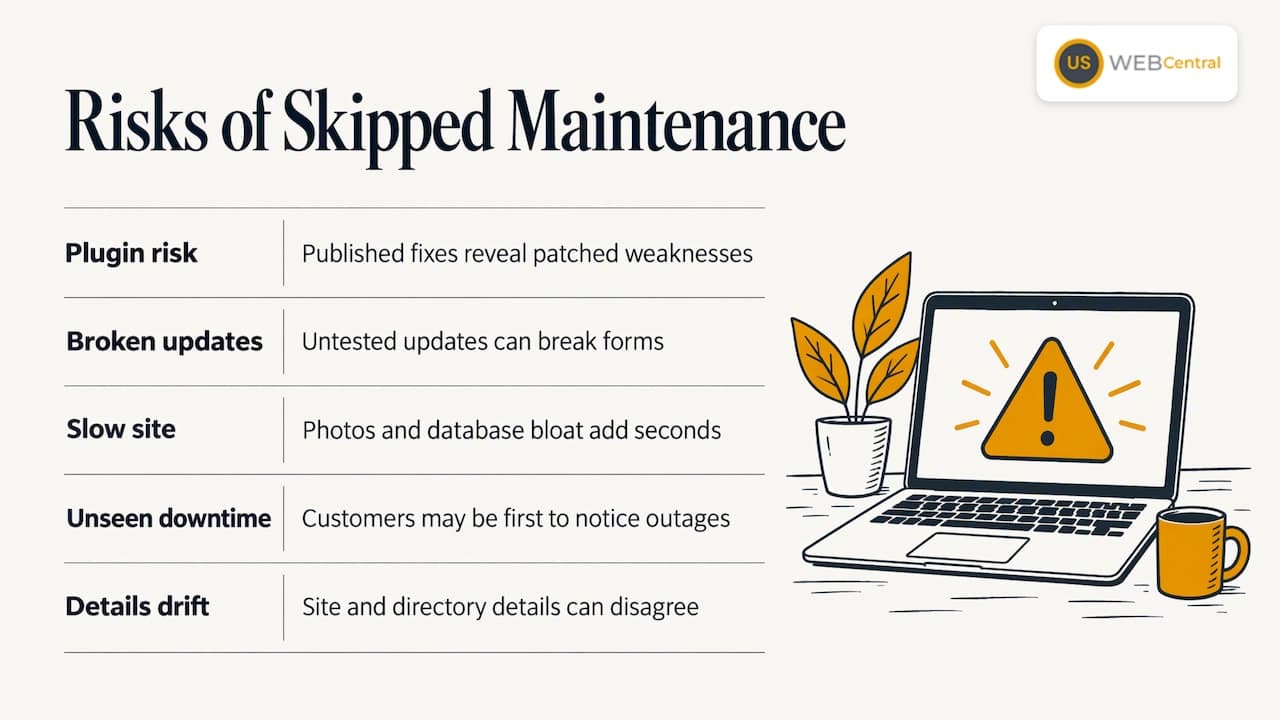
The failures are rarely dramatic at first. They build up.
An outdated plugin becomes the way in. Security problems in WordPress sites commonly come through plugins and themes rather than the core software. Once a fix is published, anyone can read what it patched. A site that has not applied it is exactly the kind automated scans look for.
An update breaks something and nobody notices. Software updates change how pieces work together. A form plugin might stop sending email, or a page builder might shift a layout on phones. Without a test after each update, the first sign is a slow week of phone calls.
The site slows down. Uncompressed photos of finished roofs or treatment rooms, old plugins and an overloaded database all add seconds to load time. Visitors on a phone in a driveway do not wait.
Downtime goes unseen. If the site is down overnight, you learn about it from a customer. Monitoring tools check the site at set intervals and send an alert, so the length of an outage depends on how often the check runs and who acts on the alert.
Details drift out of sync. Maybe you changed your phone number, added Cape Coral to your service area or changed your hours. If the site, your Google Business Profile and directory listings disagree, search engines have less reason to trust any of them. Our page on citations and NAP consistency covers why name, address and phone details must match everywhere.
What a Short Outage Looks Like
When WordPress updates itself, it briefly puts the site into maintenance mode and shows a message to visitors. That normally lasts seconds. If the update is interrupted, a leftover maintenance file can leave the site showing an error until someone deletes it. That is why a person should look at the site after updates, not just trust that they finished.
Planned work is different. A redesign or a big plugin change is best done on a staging copy, a private duplicate of your site, then moved to the live site at a quiet hour. For a service company, early morning or late evening usually suits. Visitors should not meet a half-finished page in the middle of a busy afternoon.
A word on “maintenance mode” plugins: they show a placeholder page while you work. That is fine for a brief planned job. Do not leave one switched on for days, because search engines and customers both read it as a site that is not available.
Doing It Yourself or Handing It Off
A business owner can do the basics. The steps are in the WordPress documentation, and the dashboard flags available updates. The question is whether the owner should.
The tasks themselves are not hard. The cost is attention. Updating a plugin takes a minute, but checking that the quote form, the phone button, the booking calendar and the mobile layout still work afterward takes longer, and it needs to happen every time. A contractor on a job site or a clinic manager between patients rarely has that time. When something does break, the owner is also the person who has to work out which of twenty plugins caused it.
A few signs that it is time to hand maintenance to a team:
- Update notices have been sitting in your dashboard for more than a month.
- You do not know where your last backup is stored, or when it was taken.
- You have never restored a backup and are not sure it would work.
- The site loads slowly on your own phone.
- Different people built the theme, set up the hosting and installed the plugins, and nobody owns the whole picture.
- You have changed services, hours or locations and the site still shows the old ones.
If two or more of those are true, the cheapest fix is a standing arrangement instead of a one-off cleanup. A site that is kept current costs less than one that is rescued after a failure.
What Maintenance Should Include for a Local Service Business
A generic maintenance plan covers the technical side. A local business needs more, because the site’s job is to bring in calls from Google, Maps and AI answer tools. Maintenance that ignores that is keeping the lights on in a shop nobody can find.
For a Southwest Florida contractor, clinic or service company, a useful plan covers:
- Technical health. Updates, backups, security checks and uptime watching.
- Speed. Mobile page speed checked against a standard such as PageSpeed Insights, and fixed when scores slip.
- Lead paths. Forms, calls and booking links tested regularly.
- Local consistency. Business details that match across the site, your Google Business Profile and listings.
- Fresh content. New or updated pages on the services and towns you want to win, written so search engines and AI tools can quote them.
- Reporting you can read. Calls, form fills and visits, not just a list of updates applied.
Items 4 and 5 are what separate maintenance for a local business from a basic upkeep contract. Our local SEO services work on exactly those parts, and the Google Business Profile optimization page shows how the profile and the site should support each other.
Hosting Is Part of Maintenance
Where the site lives determines how much maintenance you have to do yourself. Cheap shared hosting leaves updates, backups and speed tuning largely to you. A managed arrangement takes some of that on. We explain the difference, and what managed hosting typically costs, in managed WordPress hosting. Our SEO hosting is $250 per year.
Hosting also affects the speed side of maintenance. A well-built site on slow hosting will still score poorly, and a fast host cannot rescue a page full of oversized images. They have to be looked at together.
Our Perspective
We have built more than 1,000 sites since 2005, and the pattern is consistent: the sites that perform are the ones somebody keeps looking after. A launch is a starting line. Google, Maps and AI tools all favor sites that stay current, load quickly and say the same thing about your business that your Google Business Profile says.
That is why we do not treat maintenance as a separate chore from SEO. A contractor in Port Charlotte does not need a report that says 14 plugins were updated. They need the phone to ring. So our work ties the website, the profile, the citations and the monthly content together, and our team works directly with you instead of passing your request through layers.
If your site was built by someone else and has been left alone, a technical audit is the right first step. It shows what is out of date, what is slow and what no longer matches your listings, and it gives you a clear list of what to fix first.
Scott Carvin
What It Costs With Us
Our Lumina package is priced simply. The setup fee is $1,500 one time. Monthly Maintenance & SEO is $500 per month. SEO hosting is $250 per year. Lumina Growth Engine setup, which adds a lead-handling layer, is $500 one time, and ad setup for Sequence, Meta or Google Ads is $100 per hour. Full details are on our pricing and availability page.
For comparison purposes, consider what a lead is worth to your business. If an average roofing or HVAC job is worth thousands of dollars, one extra booked job a month changes the math of a monthly plan. For a clinic, a handful of new patients does the same. The point is that maintenance tied to local SEO is judged on leads, not on hours of upkeep.
A Plan for Your Site
If you run a service business in Sarasota County, Charlotte County or Lee County, our Lumina package gives you a custom WordPress website, Google Business Profile setup, a 12-month local SEO plan and monthly AI-ready content, with ongoing maintenance included in the monthly plan. One HVAC company reported nearly tripling its website visits after optimization, and you can read the details in the AC Heroes case study.

If you already have a site, start with a website audit. It gives you a clear picture of where you stand before you decide anything else. When you are ready to talk about the full package, see Lumina pricing and availability.
A Simple Monthly Routine You Can Hold Anyone To
Whoever looks after your site, you should be able to check these once a month in about ten minutes:
- Open your site on your phone. Does it load in a few seconds and look right?
- Submit your contact form. Does the email arrive?
- Tap your phone number. Does it dial?
- Search your business name on Google. Do the hours, phone and address match your site?
- Ask your provider when the last backup ran and where it is stored.
- Ask what was updated this month and what was tested afterward.
A good maintenance arrangement answers all six without hesitation. If you would rather not run the checklist at all, that is what a monthly plan is for. Our guide on whether you need a new website can help if the site is old enough that maintaining it no longer makes sense.
FAQ
How often should a WordPress site be maintained?
WordPress’s own documentation sets a floor of checking for updates at least every three months. For a business site that brings in leads, review updates weekly, run backups daily or after changes, and test forms and phone links monthly. A full technical audit once a year catches what the smaller checks miss.
How long is a website down during maintenance?
A routine WordPress update normally puts the site into maintenance mode for seconds. Larger jobs such as redesigns should be built on a private staging copy and moved live at a quiet hour, so visitors see little or nothing. If a site stays stuck on an error after an update, someone needs to fix it right away rather than wait.
What is included in WordPress site maintenance?
Core, plugin and theme updates, backups, security checks, speed checks, uptime monitoring and testing of forms and call buttons. For a local service business, it should also keep your site details consistent with your Google Business Profile and add fresh content for the services and towns you serve.
Can I do WordPress maintenance myself?
You can handle the basics, since the dashboard flags updates. The harder part is doing it on schedule and testing every lead path after each change. Most owners who are busy running jobs or patients find it easier to have the team that built the site look after it.
What does WordPress maintenance cost?
It depends on what is included. Our Monthly Maintenance & SEO plan is $500 per month, alongside a $1,500 one-time setup fee for a Lumina website, and it covers ongoing local SEO as well as upkeep. SEO hosting is $250 per year.
Sources
- WordPress site maintenance, WordPress.org documentation
- Hardening WordPress, WordPress developer documentation