

To optimize your Google Business Profile, verify it, fill in every field accurately, choose the right primary category, set precise service areas, add real photos, earn and answer reviews steadily, and keep your details identical everywhere they appear online. Then check the Performance data to see which actions bring calls and visits. For a contractor, clinic or service company in Sarasota, Port Charlotte or Fort Myers, the profile is often the first thing a customer sees, before your website.
Key Takeaways
- Google ranks local results mainly on relevance, distance and prominence. You can’t pay for a better local ranking, but you can improve relevance and prominence.
- The primary category, accurate service areas and a verified profile are the foundation. Get these right before you polish anything else.
- Real photos, complete details and a steady flow of reviews with replies give customers reasons to choose you.
- Your name, address and phone number should match across your profile, website and directories.
- Use the Performance dashboard to see calls, website clicks and searches, and adjust from there.
Table of Contents
- What Google Business Profile optimization actually means
- Step 1: Claim and verify your profile
- Step 2: Choose the right categories and service areas
- Step 3: Complete every field and add real media
- Step 4: Earn reviews and respond to every one
- Step 5: Keep your details consistent everywhere
- Step 6: Track what the profile is doing
- What does it cost to optimize a profile?
- Get a second set of eyes on your profile
- Our perspective
- FAQ
- Sources
What Google Business Profile optimization actually means
A Business Profile is a free tool. According to Google’s help page, it lets you manage how your business shows up on Maps and Search, keep your information accurate, and interact with customers through photos, videos and reviews. Optimizing it means making that listing as complete, accurate and convincing as you can, so Google understands what you do and customers feel safe picking you.
It helps to know what Google weighs. Google explains that local results are based mainly on three things:
- Relevance: how well your profile matches what someone searches for.
- Distance: how far you are from the person searching.
- Prominence: how well known you are, based on things like links to your business from other websites and your number of reviews.
Google also says there is no way to request or pay for a better local ranking. That is useful to know. You can’t change distance, so your work goes into relevance (categories, services, description) and prominence (reviews, links, consistent listings, engagement).
Search Engine Land’s guide calls the profile critical to local SEO. Its core advice matches Google’s: consistent business details across listings, specific categories, detailed customer reviews and prompt responses to every review.
Step 1: Claim and verify your profile
You need a Google Account to add or claim a profile. If someone else already verified a listing for your business, such as a former web vendor or an old employee, Google lets you request ownership. Do this first, because you can’t manage a profile you don’t control.
Verification is where many local businesses stall. For service-area businesses without a storefront, video verification is common. Google’s requirements:
- The video must be unedited, unique and continuous, with no breaks.
- It must run at least 30 seconds.
- You record and upload it from a mobile device, through the Business Profile.
- Review can take up to 5 business days.
A practical tip for contractors: show your branded vehicle, tools or equipment, and the area where you work. Clinics can show the entrance, signage and reception. Record it in one take.
Step 2: Choose the right categories and service areas
If you only fix one thing, fix the primary category. Search Engine Land’s Business Profile Playbooks guide cites the Whitespark Local Search Ranking Factors report, which indicates that a proper primary category is the number one local pack and Maps ranking factor.
Google’s Edit your Business Profile page says to select the category that best matches what your business does. All locations of a business must share a primary category, and you can add up to 9 more. Google’s 2026 Best Practices Playbook confirms up to 10 categories in total: one primary and nine secondary.
Some ways to think about it:
- Pick the category that describes your main revenue, not the broadest label. An HVAC company should lead with the HVAC category rather than a generic contractor one.
- Add secondary categories only for services you actually perform. If you don’t offer it, don’t list it.
- A multi-service clinic should choose the category for its core specialty first, then add related ones.
Set service areas the way customers search
If you travel to customers, Google advises entering your service area by the cities, zip codes or other places you serve, and being as specific and accurate as possible. The 2026 Playbook says you can set up to 20 service areas, and that the boundaries of your overall area shouldn’t be more than about 2 hours of driving time from where your business is based. That applies to service-area businesses with no storefront and to hybrid businesses.
For a company based in Port Charlotte, a realistic list might include Port Charlotte, Punta Gorda, North Port, Englewood and Sarasota rather than every town in the region. Choose the places where you want jobs and can actually show up. If you run more than one office, our guide to multi-location SEO covers how to keep each profile distinct.
Step 3: Complete every field and add real media
Google’s local ranking tips start with completeness: your profile should tell customers what you do, where you are and when they can visit. Work through these fields:
- Business name: use your real, everyday name, as it appears on your signage, invoices and website.
- Hours: keep regular hours current, and update holiday hours before storms, holidays or closures.
- Phone and website: use a local number and link to the page that best fits the profile, usually your homepage or a location page.
- Services: list each one by name, with a short plain description.
- Attributes and products: add those that apply. Google notes that in-store products are available for retail businesses in eligible countries or regions.
Write the description for people first
The description is your chance to say who you are, what you do and where you do it. Semrush’s optimization tips note that relevant keywords help Google understand what you offer, but that stuffing them can hurt the experience and your chances of visibility. A good rule: write two or three clear sentences that a customer would be glad to read, naming your main services and the communities you serve.
For example: “Family-owned air conditioning repair and installation serving Sarasota County. We handle emergency repairs, system replacements and seasonal maintenance.” Put what you do in the first sentence, because that is what people see first.
Photos and videos build trust
Search Engine Land’s guide reports that about 90% of consumers are more likely to visit a business with photos on its profile, and that photos drive 42% more requests for directions and 35% more website clicks. Google’s 2026 Playbook makes a similar point about photos and website clicks.
What to upload:
- Your team in uniform, in front of your vehicle.
- Finished jobs, ideally before and after.
- The exterior and interior of your office or clinic, so people recognize it when they arrive.
- Short videos of a job in progress or a facility walkthrough.
Use your own photos, not stock images. Add new ones regularly, because a profile with fresh images looks active. If you need a sense of how real job results show up on a site, see our Sarasota HVAC case study.
Step 4: Earn reviews and respond to every one
Reviews feed prominence, and they also decide whether a customer calls you or the next company. Google’s 2026 Playbook describes positive reviews as powerful social proof that builds trust and boosts visibility in Search and Maps, and says responding to reviews, positive and negative, matters just as much.
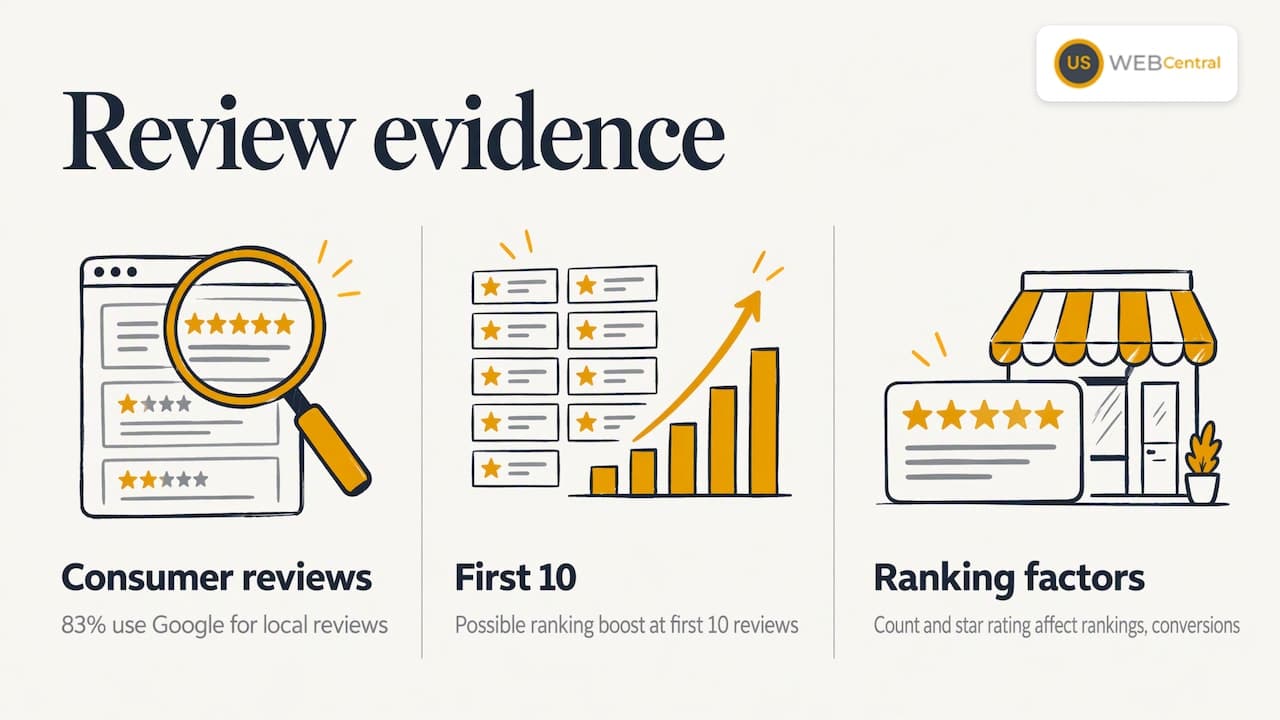
Search Engine Land says the number of reviews and your average star rating will affect both local rankings and conversions. The local SEO industry has observed that listings seem to get a ranking boost at their first 10 reviews, with no clear sign of further boosts at later milestones. The same guide cites BrightLocal data that 83% of consumers use Google to find local business reviews.
Ask the right way
The goal is a steady flow, not a burst. Search Engine Land’s Miriam Ellis frames review collection as a marathon: earn a slow drip of high-star reviews week after week by delivering great service, answering every review and setting up a formal request process.
A simple routine for a service company:
- Ask every customer after the job is complete, using the same neutral wording.
- Send a direct link to your Google review form by text or email.
- Don’t offer incentives, screen for happy customers only, ask for a specific rating or set review quotas for staff. Google’s policies don’t allow these practices.
- Reply to each review within a few days, using the customer’s situation and a specific detail.
Semrush agrees that you shouldn’t pressure customers, but that asking is a great idea and naturally brings more positive reviews.
Handle the bad ones calmly
A public, professional reply to a critical review shows future customers how you treat people. Keep it short, acknowledge the problem and offer to resolve it offline. Our playbook for responding to negative reviews gives wording you can adapt. Google also lets you report reviews, but only those that violate its policies are eligible for removal, so don’t report one just because you disagree with it.
Step 5: Keep your details consistent everywhere
Prominence also depends on what the rest of the web says about you. Search Counsel Co lists citations, meaning consistent listings of your name, address and phone number, among the signals that feed it, along with backlinks, brand mentions and engagement with your listing.
In practice:
- Use the exact same business name, address and phone format on your profile, website, Facebook page and directories.
- Make sure your website’s contact page and footer match the profile.
- Check that the services on your profile match the services pages on your site. When the two tell the same story, Google has an easier time trusting both.
If you want this handled for you, see how we approach local SEO citations and NAP consistency. And since customers now ask AI tools for local recommendations, consistent information also helps there. Our article on improving AI search visibility for a local business explains how.
Step 6: Track what the profile is doing
Optimizing without measuring is guessing. According to Search Engine Land’s guide, the Performance link in your dashboard shows how many people view your listing, a sample of the search terms that triggered it, the devices and platforms people used, and how many people called, booked or clicked through to your website.
A monthly check takes ten minutes:
- Note total calls, direction requests and website clicks.
- Look at the search terms. Do they match the services you want more of?
- Compare with the previous month, and after any change you made.
- If views are healthy but actions are low, review your photos, reviews, hours and first lines of your description. If views are low, revisit categories and service areas.
One caution on benchmarking: Yext’s research on location performance measured customer actions rather than rank and compared each location with the businesses appearing beside it in local search. It looked at 73 operational signals, including photo count, review count, average rating, attributes, review responses and freshness. The takeaway is that your profile is judged against the real businesses next to you on the results page, so compare yourself with your local competitors and not with a national average.
What does it cost to optimize a profile?
The profile itself is free. Google states that managing how you appear on Maps and Search comes at no charge, and everything in steps 1 to 6 can be done by you with time and consistency. The cost is your hours: setting it up, shooting photos, requesting reviews, replying and checking results every month.
Many owners of busy contracting and clinic businesses prefer to hand it off. Our own pricing is published on the site. The Lumina package has a one-off setup fee of $1,500 and a Monthly Maintenance & SEO plan of $500 per month, and it combines a custom website with a 12-month local SEO plan that includes Google Business Profile work. SEO hosting is $250 per year. Optional paid ad setup is $100 per hour. You can see the details on our Lumina pricing page.
Get a second set of eyes on your profile
If you’d like to know where your profile stands, we start with an audit. We look at your categories, service areas, citations, reviews and how well your website content matches your profile. Our Google Business Profile optimization service covers setup and ongoing management for Southwest Florida businesses, and the Lumina Growth Engine adds lead-generation tools on top.
Ready to see what is holding your profile back? Get My Free Audit and we will show you what to fix first.
Our perspective
We have built more than 1,000 sites since 2005, and the pattern is consistent: a profile and a website that tell two different stories lose to businesses whose stories match. The owner who says “HVAC repair” on Google, “home services” on the website and something else in the directories makes Google do the guessing.
That is why we treat the profile as part of the website project, not a separate chore. Categories, services, service areas and on-page content are planned together, then kept consistent through citations and monthly content. Customers decide quickly, and reviews, photos and clear details decide the call. The same consistency also helps when people ask AI tools for a recommendation.
One HVAC client reported nearly tripling its website visits after optimization. Results vary by business, but the method is repeatable: be accurate, be specific, be active, and measure.
Scott Carvin
FAQ
Is Google Business Profile optimization free?
Yes, the tool is free. Google says you can manage how your business appears on Maps and Search at no charge. What costs money is the time, or the help you hire, to keep the profile complete, active and consistent.
How long does verification take?
For video verification, Google says review can take up to 5 business days. The video must be unedited, at least 30 seconds long, and recorded and uploaded from a mobile device through your profile.
How many categories should I choose?
Choose one primary category that best matches your main service, then add secondary ones only for services you truly provide. Google allows up to 10 in total, but a tight, accurate set is better than a long one.
Can I pay Google for a higher local ranking?
No. Google states that there is no way to request or pay for a better local ranking. You improve your position through relevance and prominence: accurate categories and services, steady reviews, consistent listings and an active profile.
How many reviews do I need?
There is no magic number. Search Engine Land notes that listings appear to get a ranking boost at their first 10 reviews, with no clear sign of extra boosts after that. Aim for a steady flow of new, detailed reviews, and reply to each.
Sources
- Get started with Google Business Profile
- Tips to improve your local ranking on Google
- Verify your business with a video recording
- Edit your Business Profile
- Google GBP Best Practices Playbook 2026
- How to set up and optimize your Google Business Profile, Search Engine Land
- Google Business Profile Playbooks, Search Engine Land
- 7 Google Business Profile Optimization Tips, Semrush
- Good Profiles Are Graded on a Curve, Yext Research